Writings

You’re not safe on the Internet (but you could be)

It’s a wonderful Friday evening. You’re out enjoying it with some friends, eating dinner at a classy Italian restaurant, telling stories and laughing together as you share a delicious bottle of wine. It’s the perfect end to the week.

As dinner wraps up, you hand the waitress the first card you grab from your wallet, a debit card, and don’t think twice. Moments later, she returns and asks you, quietly, if you have another card they can try. Looking at the debit card in her hand, you put two and two together, and a sinking feeling creeps in.

You pick up your phone and check. Sure enough, your account has a $0 balance. You just deposited your paycheck last week, and have been careful to keep a reasonable balance in there. And it’s gone. All of it.

You can’t begin to understand what happened, as you frantically call the bank, your night utterly ruined. But someone knows. The one who drained your account. The one who entered just the right username and password. The same password you use on a dozen sites. The same one you used to order flowers three years ago on a local boutique’s site. The same site whose password database was quietly hacked last week.

The Internet is a wild place

Most people on the Internet only see the tip of the iceberg. They’re on Netflix, Google, YouTube. They’re playing mobile games, ordering from Amazon. The Internet is like a giant mall with the best shops and arcades.

There’s more to the Internet than you may see. Darknets, where identities, weapons, drugs, and the darkest of pornography can be bought and sold. Cyberwarfare and espionage between countries of all sizes. Enormous “botnets,” or networks of compromised computers just like yours that are used to attack networks and crack passwords. Teams of hackers who work to find vulnerabilities in sites or in people and exploit them for amusement, financial gain, or just to make a statement.

This isn’t a reason to fear the Internet, to fear shopping online or visiting new places. This is a reason to respect it, and to be safe.

The line of fire
“But nobody will come after me!” you might think. “I’m not important. Who would target me?”

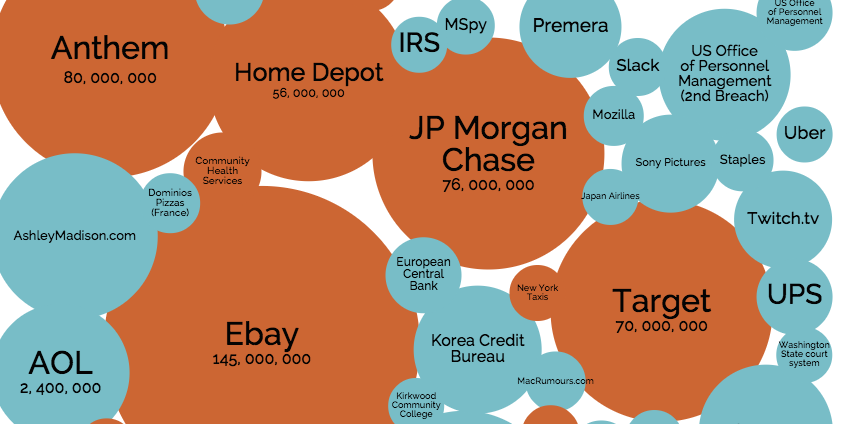
The problem with that line of thought is that it assumes a person is going after you specifically. That’s often not the case. Hackers and botnets go after many, many websites. They’re looking to hit the motherload. For instance, here’s some of the bigger sites hacked lately, and how many people were affected:

Ever use any of these? Me too.

So what happens next? Well, automated systems will harvest the results and begin trying these combinations of usernames/passwords on all sorts of different sites. Google/gmail, banks, dating sites, anywhere. And how big are these botnets? They can reach up to the 10s of millions of computers.

You are not specifically being targeted, but you’re in the line of fire. And this is going to keep happening, over and over again.

So let’s protect you from this. I’m going to teach you about three things:

  • Using passwords safely
  • Two-factor authentication, a second layer of protection and alert system
  • Identifying and ensuring secure connections to websites

And in case you’re wondering, yes, you are the target of my post. So keep reading.

Passwords: Your first line of defense
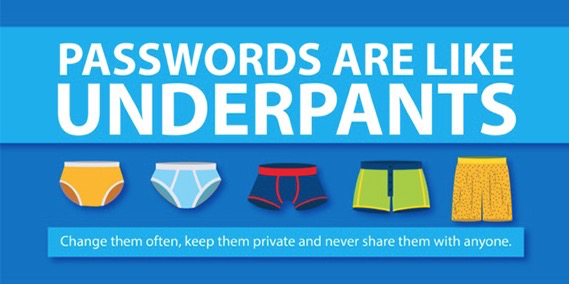
Most people on the Internet treat passwords like they’re a cute little passphrase to get into a clubhouse. We’re trained by our computers to pick something memorable to log us into our desktops, a code that “protects” you from others in the house who might want to check your e-mail. Much like a standard lock on your door protects you from your neighbors simply walking in.

Nobody ever really teaches us properly. It’s common to use your dog’s name as a password, or your birthdate, or something equally easy to remember and crack. It’s also common to use the same password or set of passwords on many different sites and services, which is how our fictitious Friday night was ruined.

This is extremely important to get right. Here are the rules for protecting yourself using passwords:

  1. Never use the same password for more than one site.
  2. Pick a long, strong password with uppercase and lowercase letters, numbers, and symbols, without any dictionary words.

That’s basically it. Seems simple enough in theory, but how do you keep track of all those passwords? You’d probably have 50 of them!

Don’t worry, there are tools that make this super easy.

1Password

This is one of my favorite tools for staying secure.

1Password is a tool for keeping track of your accounts and generating new passwords. It works with your browser and remembers any password you enter, and makes it really easy to fill in passwords you’ve already entered.

When you’re creating a new account or changing passwords, it’ll help you by generating strong, secure, nearly uncrackable passwords. For example, here’s one it just made for me: wXXgVzb8Zp(zwmjG7zBGkg=iT.

It’s available for Mac, Windows, iPhone, iPad, and Android. It’s free for iPhone, iPad, and Android, and costs only $35 for Mac and Windows (which is a bargain for what you’re getting).

Let me show you how it works.

I’m about to log into an account on Facebook.
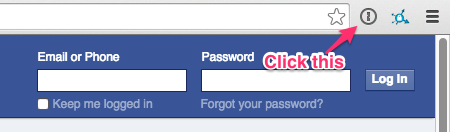
Instead of typing my login and password, I just click that little keyhole icon next to the address bar, which will pop up any 1Password entries I have for Facebook.
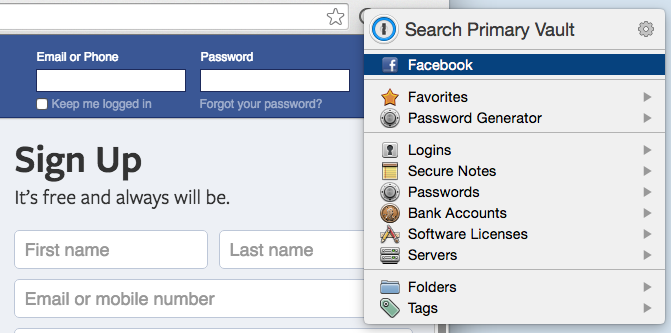
Once I click “Facebook,” it’ll fill in my username and password and log me in. It’s just that simple.

When you’re signing up for a new account, use the Password Generator, like so:
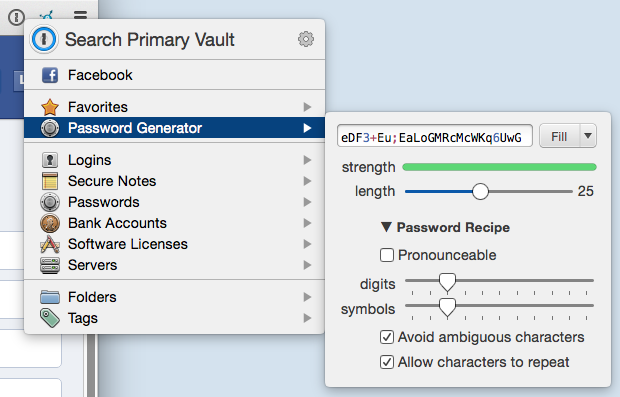
Once you create the account, 1Password will remember the password for later. Look at that thing. Nobody’s cracking that!

This all works for any site, and even works on your iPad/iPhone:

1Password is great for more than passwords. It can keep secure notes, information on your credit cards or bank accounts, or really anything else you have that you want available but locked away.

In order to access your stuff in 1Password, you only need to remember a single password of your choosing. Make sure this is a strong one, and that you don’t forget it! Write it down if you have to.

Buy 1Password and use it. Look, $35 is nothing compared to the potential fallout of being involved in the next several major security breaches.

LastPass

LastPass is an alternative to 1Password, and is great if you’re an Android user. Usage is pretty similar to 1Password.

I don’t personally have a lot of experience with LastPass, but a lot of people love it. You can learn more about it on their site.

Pen-and-paper password journal

I’m sure you’ve been told before that it’s a bad idea to write down your passwords, am I right? Afterall, if you write them down, then gee, anyone can get them!

That’s not entirely true. The fact is, you’re more at risk reusing one or two weak passwords on the Internet than keeping dozens of strong passwords written down on paper in your home.

Let’s be clear, this is not the best option, and if you’re going to do this, keep it secret, keep it safe. Still, it’s better than not having strong passwords. If at all possible, use 1Password or LastPass, but if you absolutely must, write them own on a dedicated journal that you can keep safe somewhere. Don’t lose it, and always use it for every password.

Two-Factor Authentication: Second line of defense

You’re now using stronger passwords, and you have friendly tools to help manage them. Good job! The next step is making sure that only you can log into your most important websites.

Many sites and services (Google, Apple, Dropbox, Evernote, Bank of America, Chase, and many others) offer an extra security layer called “two-factor authentication.” This is a fancy term for “We’ll only log you in if you enter a code we’ll send to your phone.” When enabled, these services will require something you know (your login/password), and something you have (your phone).

Let’s take Google, for example. You can set things up so that after entering your username and your brand-new secure password, Google will send you a text message with a 6-digit code. Once you receive the text (which only takes a second), you’ll enter it on the site, and you’ll be logged in.

Now why would you do that? To prove that you are the one logging in, and not someone who’s figured out your password. The cell network’s going to make sure that text is only going to your phone, and you’re going to prove it’s you logging in. (Some services will require that you use a specialized app, or a hardware device that fits on your keychain, but most will work with text messages.)

Imagine someone did get a hold of your password, and tried logging in. You’re still going to get that text, but that person will not. He/she won’t be able to log in as you. You’re safe! It’s also going to be a dead giveaway that your password was compromised. You’ll want to change it right away.

Basically, this is both your gated community and your alarm system.

This is pretty easy to set up at most places. Here are some guides:

You can find more at twofactorauth.org. Just click the icon under “Docs” for any service you use that’s green.

I’ll be honest with you, this will feel unfamiliar at first, and you might be tempted not to do it. Trust me, though, this is worth turning on for as many services as possible. You’ll be glad you did next time one of these companies announces a security breach.

Identifying and ensuring secure websites

Let me briefly explain how the Internet works.

When you connect to a website, the browser will usually try to access it first over the “HTTP protocol.” This is the language that browsers and web servers speak. This communication is in plain text, which means anybody that listens in can read what’s being posted. This is sort of like handing a piece of paper to someone, and having them pass it along to the next person, and so on, until it reaches its final destination.

That’s very bad if you’re sending anything confidential. Passwords, for instance. It’s important that you learn to identify when you’re on a secure website.

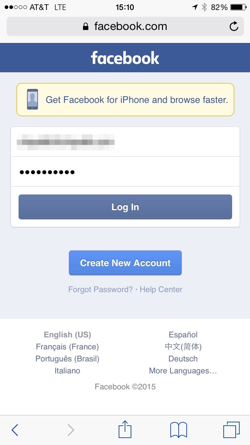
You know the address/search bar on your browser? Look to the left. If you see http://, or you don’t see anything but an icon and a domain name, you’re on an insecure website.

However, if you see https://, or a lock icon, or a green banner, you’re good! This is using HTTPS, an encrypted connection, meaning that nobody in-between can listen in. That’s more like writing your letter in gibberish that only you and the final recipient understand.

For comparison, these are secure:

This is not:

Always look for these before filling out any forms. If it’s not showing a green banner or lock, you don’t want to give the site any sensitive information.

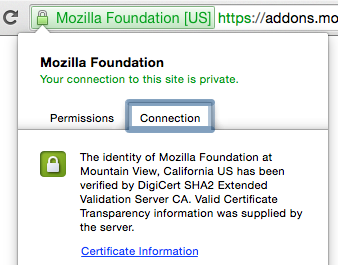
If you see a green banner, it’ll show the name of the company or organization. This is showing that the encrypted channel and website have been verified by a “certificate authority,” an entity that issues certificates for these encrypted channels. It means they’ve checked that, for instance, ally.com is owned by Ally, and not by someone pretending to be Ally.

If you click the banner or the lock icon, you’re going to see some more information about the connection. Most of this will be highly technical, but you should see some blurbs about who verified the authenticity of the site, and some information on the organization owning the site.
Most websites these days are moving to encrypted HTTPS connections, and most will automatically redirect all requests from HTTP to HTTPS. This is good, but you can go a step further and have your browser always start out using the HTTPS connection whenever possible. This takes almost no effort, and is worth doing.

This is done with a browser extension called HTTPS Everywhere.

If you’re running Chrome as your browser, simply install it from the Chrome store.

If you’re running Firefox, install it from the Firefox add-on store.

Did you do it? Great, you’re done! You’re now a little bit safer on the Internet!

Putting it all together

I threw a lot of information at you, but hopefully you’ve learned a lot and will put it into practice.

So let’s summarize. If you follow the above, you’ll:

  • Be at less risk for identity and financial theft the next time there’s a major security breach, since your passwords won’t be shared.
  • Be alerted when someone tries to log in as you on any service with two-factor authentication enabled.
  • Have passwords strong enough to be unguessable and nearly uncrackable, for all sites and services you use.
  • Know how to identify secure websites, so you don’t leak passwords or other private information to anyone who’s listening in.
  • Automatically connect to the most secure version of a website whenever possible.

Not bad for a little bit of work. Hopefully by now, you realize that this does matter, because you, I, and everyone else really is a target, simply because we’re all part of something large enough to be a target.

So pass this around. Tell your friends about what you’ve learned. Educate your kids. Stay safe on the Internet.

You’re not safe on the Internet (but you could be) Read More »

A better web through spreadsheets

I’ve spent the past couple of days basically living in spreadsheets, crunching sales data, entering equations, building pivot tables and forecasts, and painstakingly toggling cell borders… Your typical spreadsheety stuff. (And I didn’t go crazy at all.)

While spreadsheet work is a task an engineer would often dismiss, loathe, and try to pawn off onto an intern or manager, I’ve come to realize the opportunity we as an industry have missed.


A world on a web

The World Wide Web has been a part of most people’s lives for a couple of decades now. It has transformed society, and we take it for granted today. Before the web, communication wasn’t quite so pleasant. We had to visit our friends in person if we wanted to talk or play a game together. The events of a wild party stayed mostly in the minds of the participants, and couldn’t easily be shared with millions of people around the world. We didn’t even know that cats and cheeseburgers went so well together.

That's not what I meant!
That’s not what I meant!

It was the dark ages, and frankly, we should be embarrassed to even talk about it.

Then a wonderful man named Sir Tim Berners-Lee created the Web. There were probably other people involved, but it doesn’t matter really. The point is, he did a pretty great job and we should all buy him a drink if he’s in town.

Let me briefly explain how the web works on a technical level, using a common analogy of computers as tactical submarines. Imagine you’re in a US submarine (your computer) and you want to get some cat pictures from the guy in the Russian submarine (a Russian server). You know where in the sub he is (a “URL”), and know that the only way to get to him is through an unsecured port (we call this a “HTTP port”) or a mostly-secured-but-sometimes-not port (“HTTPS port”).

You’d load a torpedo with a letter asking for cat pictures (these are “packets”) and fire it off through their port (“HTTP/HTTPS”) into the location of the guy with the pictures (“URL”). Being trained to handle this, the torpedo would be intercepted, a new one stuffed with cat pictures, and fired back at your submarine.

This is the primary use of the web. Not so much torpedoes.

That’s… basically how the web works.

Oh and there’s also HTML. This is the universal language of web pages. It comes with a family of other technologies, like CSS, JavaScript, VBScript, Dart, Silverlight, Flash, Adobe Flex, Java, ActiveX, and a myriad of innovative plugins.

Where was I? .. Oh yeah, spreadsheets.

(Spreadsheets are more like Battleship. A5! B12!)


The missed opportunity

We have built the world’s communication, social interaction, and repositories of cat pictures on top of the web, and therefore HTML (and co).

What I’ve realized over the past two days is that building it on top of HTML was a mistake. We should have built it on top of spreadsheets.

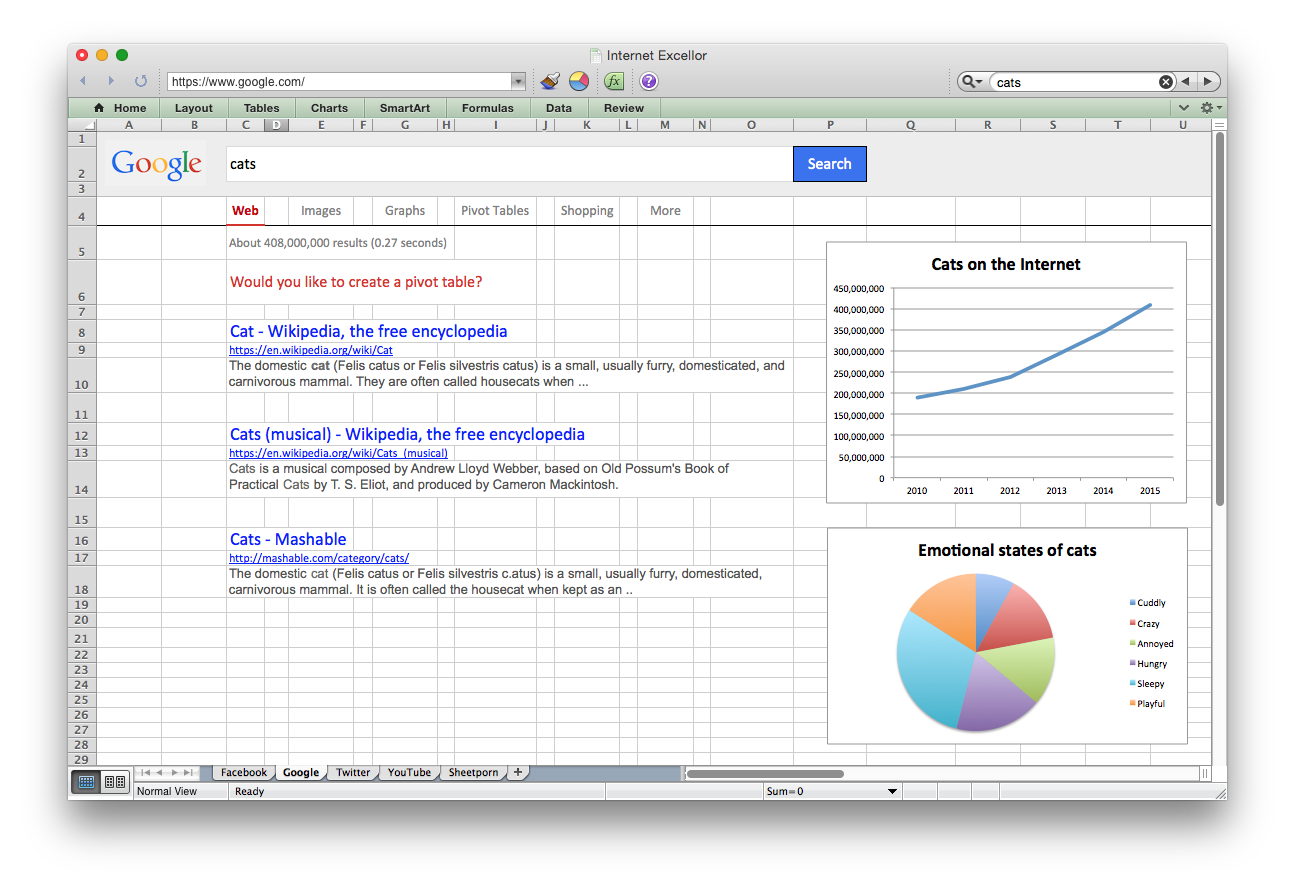
We could have had this!

Hear me out.

Spreadsheets have been around a long time, and unlike HTML/CSS/JavaScript, people just naturally understand them. They’re simple, intuitive, and fun!

In the dark times before tab-based browsing, a time when browser manufacturers thought window management should most resemble the winning animation of Solitaire, Spreadsheets had multiple tabs. The right technology coud have put us years ahead of where we are now.

As developers, we face religious wars over table-based layouts vs. non-table-based layouts. We waste thousands of man years on this. Spreadsheets, being nothing but table-based, would have saved us all a whole lot of trouble.

It took a long time for the world to realize JavaScript could be used for more than scrolling status bar updates and trailing mouse cursors; it could be used to write useful things, like Facebook and Twitter! All the while, spreadsheet power users were writing complicated macros to do anything they could ever want. I mean, look at this guy who wrote a freaking RPG in Excel!

Look at those graphics.
Look at those graphics. Look at them.

Spreadsheets are inherently social. You can save them, edit them, pass them out to your friends. You can’t do that with your Facebook wall. Ever try to save or edit someone else’s webpage? Yeah, I bet that worked out great for you.

Developers, how many different third-party APIs are you dealing with in order to generate some meaningful statistics and reports for your app/startup? How much money are you paying to generate those reports? How much code did you have to write to tie any of this together? In the spreadsheet world, you’d just stick some pivot tables and graphs on the page and call it a day, spend some time with your family.

None of this nonsense with disagreements between slow-moving standards bodies that keep going back-and-forth on everything. Instead, I think we’d all feel comforted knowing we could leave this all in the hands of Microsoft.


What can you do…

I know, I know. It seems so obvious in retrospect. I guess all I can say on their behalf is that the web was once a new, experimental project, and such things are rarely perfect. Even my projects have some flaws.

Sir Tim, call me. We’ll get this right next time.

A better web through spreadsheets Read More »

Remembering the Line Ride

I spent the holidays at Disneyland this year with my girlfriend and my family. We stood in numerous lines for hours on end during the busiest week of the year, waiting to see Disney’s take on classic rides such as the Haunted Mansion and Small World.

Their take was fantastic, but this post is not about that.

Standing in line for the Haunted Mansion, listening to people murmur about how agonizing the lines were, it dawned on me that not everybody understood nor appreciated the true origins of these amazing amusement parks. My sister certainly didn’t know, and neither did my girlfriend.

You may not either, so allow me to share a bit of history.

Back to the middle ages

Much of what we’ve come to enjoy in amusement parks originated from fairs in the Middle Ages [1]. The food, the shows. They were further inspired over time by other events and inventions throughout the centuries that followed. One of the innovations in amusement technology that really sparked the modern era of amusement park rides was a classic mechanical ride, the steam-powered carousel, built by Thomas Bradshaw at the Alysham Fair in 1861 [2].

The problem with technological innovations is that they overshadow the simpler pleasures that came before them.

The Line Ride

Long before the carousel, in 1733, people enjoyed a simpler tradition. The humble fairgrounds in those days were unlike the marvels we have today, but were still full of events for children and adults of all ages.

One of the most beloved traditions in those days was known as the Rope Line Ride, or the Line Ride for short. Long lines of rope, attached to tall stakes in the ground, would be laid out in all sorts of patterns, forming paths for the kids to traverse. Common patterns included the spiral, the back-and-forth, and the weave.

Participating in the Line Ride was simple. A person would start at one end, following the line, seeing where it took them (by a garden, perhaps, or a wall of funny drawings), eventually coming out on the other side.

Remember, these were the days when Kick the Can and Hoop Rolling were the rage. The Line Ride was so popular that it was often nearly full of people, but this gave them time to socialize and join together in the admiration of their surroundings.

Evolution of the Line Ride

Times change, as they often do. While once a fun and common attraction, the younger generations began to grow weary of the Line Ride. In 1861, Thomas Bradshaw, the aforementioned inventor of the steam-powered carousel, forever changed the Line Ride by making it a means to an end. He put the carousel at the very end of the Alysham Fair Line Ride.

Now, instead of simply enjoying the Line Ride for what it was, people were passing through it, with great impatience, just to get to the all-new steam-powered carousel.

A new tradition was born. The Line Ride no longer became an attraction itself, but rather simply the Line, a way to control the flow of people leading up to an attraction. This was seen as a very controversial change in its day — after-all, the Line Ride was a tradition going back over a hundred years — and with it came a distrust of the newer attractions by the older generations. Of course, time passed, and the Line became the norm.

The spirit carries on

While often forgotten as an attraction, the Line Ride’s spirit remains today in our terminology and our parks. We’re all familiar with celebrities walking down the rope line, or hearing about people “working the rope line.”

And, of course, the long, grueling lines leading up to the popular attractions at amusement parks and carnivals around the world.

Remembering the Line Ride Read More »

Breaking back into your network with the Synology Web UI

Have you ever left town, or even just took a trip to the coffee shop, only to find that you’re locked out of your home network? Maybe you needed a file that you forgot to put in Dropbox, or felt paranoid and wanted to check on your security cameras, or you just wanted to stream music. I have…

The end of a long drive

Last night, I arrived at my hotel after a 4 hour drive only to find my VPN wasn’t working. I always VPN in to home, so that I can access my file server, my VMs, security cameras, what have you. I didn’t understand.. I was sure I had things set up right. You see, I recently had my Xfinity router replaced, and had to set it up to talk to my Asus N66U, but I was absolutely sure it was working. Almost sure. Well, I thought it was working…

So I tried SSHing in. No dice. Hmm.. Any web server ports I exposed? Guess not. Maybe port forwarding was messed up somewhere?

Ah HA! I could reach my wonderful Synology NAS’s web UI. If you haven’t used this thing, it’s like a full-on desktop environment with apps. It’s amazing. Only thing it’s really missing is a web browser for accessing the home network (get on this, guys!). After spending some time thinking about it, I devised a solution to get me back into my home network, with full VPN access (though, see the end of the story for what happened there).

Christian’s step-by-step guide to breaking in with Synology

No more stories for now.

To get started, I’m assuming you have three things:

  1. Remote access (with admin rights) to your Synology NAS’s web console.
  2. A Linux server somewhere both sides can log into remotely (other than your local machine, as I’m assuming yours isn’t publicly connected to the network).
  3. A local Linux or Mac with a web browser and ssh. You can make this work on Windows with Putty as well, but I’m not going into details on that. Just figure out SSH tunneling and replace step 7 below.

All set? Here’s what you do.

  1. Log into your NAS and go to Package Center. Click Settings -> Package Sources and add:
  2. Name: MissileHugger
    Location: http://packages.missilehugger.com/
  3. Install the “Web Console” package and run it from the start menu.
  4. Web Console doesn’t support interactive sessions with commands, so you’ll need to have some SSH key set up on your linux server’s authorized_keys, and have that key available to you. There’s also no multi-line paste, so you’ll need to copy this key through Web Console line-by-line:

    Locally:

    $ cat ~/.ssh/id_dsa

    On Web Console:

    $ echo "-----BEGIN DSA PRIVATE KEY-----" > id_dsa
    $ echo "<first line of private key>" >> id_dsa
    $ echo "<second line of private key>" >> id_dsa
    $ ...
    $ echo "-----END DSA PRIVATE KEY-----" >> id_dsa
    $ chmod 600 id_dsa
  5. Establish a reverse tunnel to your Linux box, pointing to the web server you’re trying to reach (we’ll say 192.168.1.1 for your router).

    Remember that Web Console doesn’t support interactive sessions, or pseudo-terminal allocation, so we’ll need to tweak some stuff when calling ssh:

    $ ssh -o 'StrictHostKeyChecking no' -t -t -i id_dsa \
          -R 19980:192.168.1.1:80 youruser@yourlinuxserver

    The ‘StrictHostKeyChecking no’ is to get around not having any way to verify a host key from Web Console, and the two -t parameters (yes, two) forces TTY allocation regardless of the shell.

  6. If all went well, your Linux server should locally have a port 19980 that reaches your web server. Verify this by logging in and typing:
    $ lynx http://localhost:19980
  7. On your local machine, set up a tunnel to connect port 19980 on your machine to port 19980 on your Linux server.
    $ ssh -L 19980:yourlinuxserver:19980 youruser@yourlinuxserver
  8. You should now be able to reach your router. Try it! Open your favorite browser and go to http://localhost:19980
  9. Clean up. Delete your id_dsa you painfully hand-copied over, if you no longer need it, and kill your SSH sessions.

Epilogue

While this worked great, and I was able to get back in and see my router configuration, I wasn’t able to spot any problems.

That’s when I realized my Mac’s VPN configuration was hard-coding my old IP address and not the domain for my home network. Oops 🙁

Hope this helps someone!

Breaking back into your network with the Synology Web UI Read More »

I Invented Port Knocking

Let me tell you about something that’s been bothering me for a while.

I invented Port Knocking. No, really. In 2002.

According to portknocking.org, it was invented by Martin Krzywinski in 2003. I’m not here to debate that he didn’t come up with the idea separately, and choose the same names (it’s a pretty good name for the technology). But I do want to make it clear, for the record.

Wait, hold on, what’s Port Knocking?

Oh, got ahead of myself there.

Port Knocking is a security method where you can cloak a network completely (close all ports or put them in stealth mode) and yet still allow access from any computer in the world, by way of a sequence of “knocks” on a predefined list of ports.

The server can specify a list of ports (say, 53, 91, 2005, 2131, 7) and monitor to see if there are attempts to open them. If an outside computer accesses each of these ports in sequence, without hitting any other ports, and within a time period, the server can open a select set of ports (separate from the knock list) to that IP address only.

In my original designs, before opening the ports after a successful knock sequence, an authentication port would be opened at a predefined port, which the client would have to access, exchanging credentials, before the ports would be open.

And why the controversy?

First, some history.

In mid-2002, I was 18 and interested in security, amongst other things. Along with writing code for Pidgin (then Gaim), and a couple other projects, I was fooling around with firewalls and such.

I had this idea one morning while in the shower to add another layer of security. I really wanted to be able to completely close off my network, but still access it when out of town. I can’t tell you how it came into my head. Just a moment of inspiration. I wasn’t even really looking for another project, just brainstorming, but I liked the idea too much. I started writing code and made it work.

It was a while before I discussed it publicly on my old blog on Advogato. There are many posts, but I’ll highlight a couple here, where I introduce what I was working on:

The blog is full of lots of old teenage angst, so ignore most of it, but I spend the next few weeks going over my progress, answering questions from people who are asking for more information, etc. I was very open about it.

At one point a couple months later, I realized this was stupid. I had a good idea. I should patent it. I took it down for a while. This was after I had already put up the sourcecode, though, and many people had it.

Now, in retrospect, I should have made this into a full-on open source project and gained the recognition myself, continued development. But I was too busy with other things and didn’t really want another major product on my hands. I remember at one point I thought, “maybe I can sell this to a security company, or patent it!”

And since then…

One day, I opened a magazine and saw “port knocking” on the cover. My heart skipped a beat. Somebody wrote an article on my port knocking! I opened the magazine and read through it. “Invented by… Michael Krzywinski? What?!” I re-read to make sure. It was all my terminology, my methods. I was floored.

By that point, he made a name for himself as the inventor. And again, I’m not trying to discredit him, because he very well may have come up with the same thing separately. But it stung, because I had a great idea, a year before he wrote a paper on it, and I didn’t promote it the way he did.

Lesson learned

This is one of those life lessons. You always regret what happened, but you use it to make better decisions in the future. These days, I’m happy working on some awesome products. My day job at VMware and my highly successful code review software, Review Board (for which we’ve recently started a company).

Now, if I have a good idea, I make sure it’s heard, and demonstrated, far and wide. Truly great ideas don’t really come that often, so when you have one, make sure you do something with it, or you may end up regretting it for years to come.

I Invented Port Knocking Read More »

Sentience discovered in the Linux kernel

Ladies and gentlemen, after much experimentation, I have made a remarkable discovery. Perhaps the very first case of a sentient AI has been discovered, sitting right under our noses, in the Linux Kernel. With such a complicated codebase that has evolved greatly over the years, there are certainly more surprising places for it to spring up, but it’s still quite unexpected.

And where, specifically, has this sentience manifested itself? The suspend/resume code.

See now, like many of you, I’ve dealt with the instabilities of suspend/resume. I’ve considered it to just be buggy, unreliable, and possibly incompatible with my hardware. That is, until I realized that there’s a pattern. One that began to make a sort of sense.

A couple months back, I gave suspend/resume another shot, and to my surprise it worked. I figured that Ubuntu 10.04 finally fixed it, but it still wasn’t perfect. I still noticed problems.

The first thing I noticed was that when I unsuspended at work, I couldn’t use my volume keys. Everything else was fine, but my laptop’s volume keys didn’t register as a key press on anything. If I suspended again and brought it back home, the keys would work fine. If I suspended at home and resumed at home, I wouldn’t have the volume key problem. Weird, but just buggy, right?

It was a couple weekends ago when I suspended my laptop to take it somewhere. It wouldn’t suspend at all. Just hard-locked. This continued until the week, when it worked again. Last weekend? Same problem, couldn’t suspend. Monday, it worked fine.

It was then that I realized suspend/resume was breaking deliberately! See, my laptop feels more comfortable at home, less so at work but it tolerates it (with some complaining), but absolutely doesn’t want to leave during the weekend. It’s like a cat that just wants to be in a familiar environment, selfishly vying for your attention through mischievous acts. Look at it hard enough and the pattern emerges. It’s undeniable.

That got me thinking. What other possible instances of AI have we been misconstruing as bugs or random glitches? All those inter-connected street lights that occasionally shut off as you walk underneath them? Maybe they’re just shy, or they hate you. Maybe NES cartridges just found being blown stimulating.

So remember guys. Windows suspend/resume may work just fine. Mac too. But Linux’s suspend/resume isn’t a buggy pile of crap. It’s an intelligent buggy pile of crap, that just wants to be loved.

Sentience discovered in the Linux kernel Read More »

Racism, Sexism, and now Prop 8

I found out this evening, to my dismay, that my site was littered with “Yes On Prop 8” banners. Now, for those who live outside California and haven’t been following this, Prop 8 is a measure designed to introduce an amendment to the California constitution to ban gay marriage, basically ensuring that certain people would never have the same rights as others in this state.

Now I normally try to stay away from politics on my blog, but I want to talk about two points.

First, I don’t mind banners on my site that are designed to sell a product. People generally understand that an ad for an online web service or a product of some sort is not necessarily endorsed by the site it’s running on. Ads are everywhere and most people generally get that it’s provided by an ad service, and just ignore them.

What bothered me about the Yes On Prop 8 ads is that it felt as if I’m endorsing Prop 8. Somehow, it feels wrong to me. I’m not morally outraged about Sun Microsystems wanting to sell a server system or Microsoft wanting to sell an office suite. I am outraged about Prop 8. Products are fine to advertise on my site. Controversial freedom-limiting propositions I’m completely against are not.

I look back in our history and see that by and large, our generation is regretful of how we’ve mistreated people in the past. Shooting Native Americans used to be fine. Stripping away their rights and making them unequal was socially accepted. It was completely understood that if you’re black, you’re property. If you’re a women, you had no rights to vote and your opinion didn’t matter.

I like to think we’ve come a long way from that. People pride themselves on how we’re more mature now. Black, white, red, men, women. It doesn’t matter. This is the land of the free, the land of equality. So why is it that it’s still okay to discriminate against someone because their love of someone makes you feel uncomfortable?

It’s okay to not feel comfortable with gay marriage. A lot of people don’t. But do you feel more comfortable being part of a group of people that knowingly discriminated against another group, stripped them of certain rights that you yourself enjoy, simply because something you don’t have to deal with on a daily basis makes you feel uncomfortable to think about? Are you going to be okay with the thought of your grandkids or your great-grandkids feeling embarrassed because of how you voted, like how you feel about your great-grandparents’ racism? How much is preventing marriage for two people who love each other, in order to feel less uncomfortable, worth to you?

The Yes On Prop 8 advertisements often show the clip with the mayor of San Francisco saying “It’s going to happen, whether you like it or not!” It’s a good strategic clip for them to have chosen, as it can be interpreted as him saying “you have no say, we’re forcing gay marriage on all of you.”

I see it another way. I see gay marriage being inevitable not as an attack, but as the inevitable rise in tolerance that, over time, we’ve come to develop in this country. As a country, we don’t have the best track record of tolerance to new things, but we always mature in the end. This is not the last time we’ll face such mass intolerance and the limiting of rights of a group of people, just as this will not be the first time that we as a people will overcome our fears and begin to see us all as being equal.

So this is important. It’s not just about your level of comfort with those who live a different lifestyle. It’s about equality. It’s about overcoming personal fears. It’s about making an effort to keep this country on a path of freedom. Because if we start going back to our old ways of discrimination and fear, all we’re doing is regressing and limiting the rights of others out of some fear of the world spiraling into chaos. We’ve worked to abolish racism. We’ve worked to abolish sexism. The world is still here. We can do this again.

Vote no on Prop 8.

Racism, Sexism, and now Prop 8 Read More »

Random friend seeking on Google Talk?

Has anybody else noticed this?

Over the past several months, I’ve had a few people add me to their Google Talk account, claiming they want to make friends. The conversations start simple enough, asking basic “getting to know you” questions. Nothing seems too prying, and it certainly doesn’t seem like a bot. However, in each case, something doesn’t fully seem to add up, or maybe I’m just being paranoid. Either the person doesn’t remember how they found my address, or they claim they were just trying random addresses. Some people are from India, some from the US. However, they never seem to be able to find a picture when requested. They look and look but never manage to find one, and then suddenly have to go.

I’ve IM’d with a couple of them for a few days, a week, just to see if they were going to ask any questions indicating they were looking for specific information, but they haven’t really.

I’d feel bad if these were actually real people just “looking for a friend,” as they’ve said, but the fact that nobody can seem to give me a good reason for how they got my info concerns me, as does the behavior about a picture. Have other people seen this? Is it some new kind of weird spam/info gathering attempt? Or what?

Random friend seeking on Google Talk? Read More »

5 ways to make Twitter work for you

I’m a big fan of Twitter, the social presence site that’s been getting a lot of buzz lately. It’s an idea that was almost too easy. Provide a way for people to say what they’re doing right now. Allow other people to see it, in a semi-controlled manner. It’s kind of like away/available messages on MSN, AIM, Google Talk, etc., but separated from the actual IM accounts and put in a central place.

Now, Twitter as a lazy form of blogging seems silly to many people who just don’t want to share what they’re doing every minute with the world. Fortunately, Twitter’s power is in its simplicity, and it can be useful in other ways. Here’s five ways you can make Twitter work for you.

  1. Status reports

    Like many people, I’m supposed to submit a weekly status report to my manager describing what I’ve done in the week. I typically start writing it up on the day it’s due, trying hard to remember everything I’ve done. Sometimes I’m good and actually write these down as I go along, but then I spend too much time organizing it on paper, when I should be doing that when I prepare the actual status report.

    Alternatively, I could use Twitter to record things as I do them, and then look over my archive or at an RSS feed of my activity when I begin to prepare the status report. Entering data into Twitter is quick and easy, and it gives you enough room for a short description while at the same time limiting what you need to say. So in the end, you have a nice summary of your week.

    Depending on how public you want it, you could even inform other co-workers of your Twitter account, making it easier for people to know who’s working on what. Not long ago I posted a Twitter update about something I was doing and a co-worker immediately came in and asked about it. Pretty useful.

  2. Keep organized at conferences or events

    When at conferences or some sort of large gathering, it’s easy for people to get out of sync with each other. Dinner appointments may be missed, people may end up in different talks, or whatever. The solution I’ve been personally using in the past is to try to catch everybody on IRC or IM, or just call/text message the people involved. However, this can be a pain and can involve a lot of micro-management.

    Instead, get people to create Twitter accounts and add each other as friends. Set up SMS notification and communicate through Twitter posts. You can send a quick “This conference is ending in 10 minutes, so let’s meet at McDonalds for lunch at 2:30” post to inform everybody of the current plans. You don’t even need access to a computer, as you can send updates via SMS as well. For most phone services, sending this one SMS is going to be cheaper and easier than sending SMS messages to multiple people, so there’s a net win here.

    You can apply this to parties or to school as well.

  3. “Note to self…”

    How often have you thought of something you need to do or something to remember for later, or even a neat piece of info that you know you’re going to forget? I’d say a lot of us aren’t organized enough to have a central place for these notes. I typically use post-its, but those become disorganized quickly, and by the time I think about it later, I’ve lost the note.

    Give Twitter a try for anything of the “Note to self” variety. You can refer back to these notes later in your RSS reader or your Twitter archive page.

  4. News updates and release announcements

    Many projects maintain a news update or release announcements listserv or RSS feed, but Twitter is a pretty good alternative as well. Many people check their Twitter page throughout the day or are in some way notified (via a program or SMS message) when someone posts to Twitter. Take advantage of this by creating an account for your project and posting whenever there’s a new release. It might get to your users faster.

    A couple examples of projects making use of Twitter in this regard include WordPress and 30Boxes.

  5. Record your travels

    I often take a lot of pictures when travelling, but forget exactly what I did on what day. Makes it harder to write about it later or associate meanings to the pictures when I finally go to upload them.

    Given Twitter’s ability to post via SMS, it’s easy to make brief notes about your trip as you go. Others can see how your trip is progressing, and you can use those notes later to document your trip better.

For those who know me and use Twitter, feel free to look me up or add me. I’ll be posting a few other tricks I’m experimenting with in a future post, such as how to tag your Twitter posts and separate them into multiple RSS feeds.

Other interesting Twitter reads:

  • Twitter Lingo – Controlling Twitter through SMS
  • Twitterholic – List of the top 100 users of Twitter in order of number of followers
  • RSS2Twitter – Auto-converts RSS feeds to Twitter posts
  • Twitter Tools – Several tools, clients, mashups, and plugins for working with Twitter

5 ways to make Twitter work for you Read More »

Scroll to Top