There’s a lot about Faxanadu that’s been kept secret since the game was originally developed in the 80s. Secrets I’ve been discovering in my Faxanadu disassembly work.
One of the most surprising to me was hidden code for a World Warp, letting you jump to any of the 6 regions of the game: Eolis, Trunk, Mist, Branch, Dartmoor, or the Evil Fortress.
All with a single button press. (And a couple of Game Genie codes.)
During development of Faxanadu, code was put in the game to make it easy to jump to other areas within the game for testing. This isn’t an uncommon thing for game developers to do. You don’t want to have to play through half the game every time you want to re-test the fog animation in the world of Mist.
This code was wired off from the rest of the game, existing only as a sequence of 44 bytes.
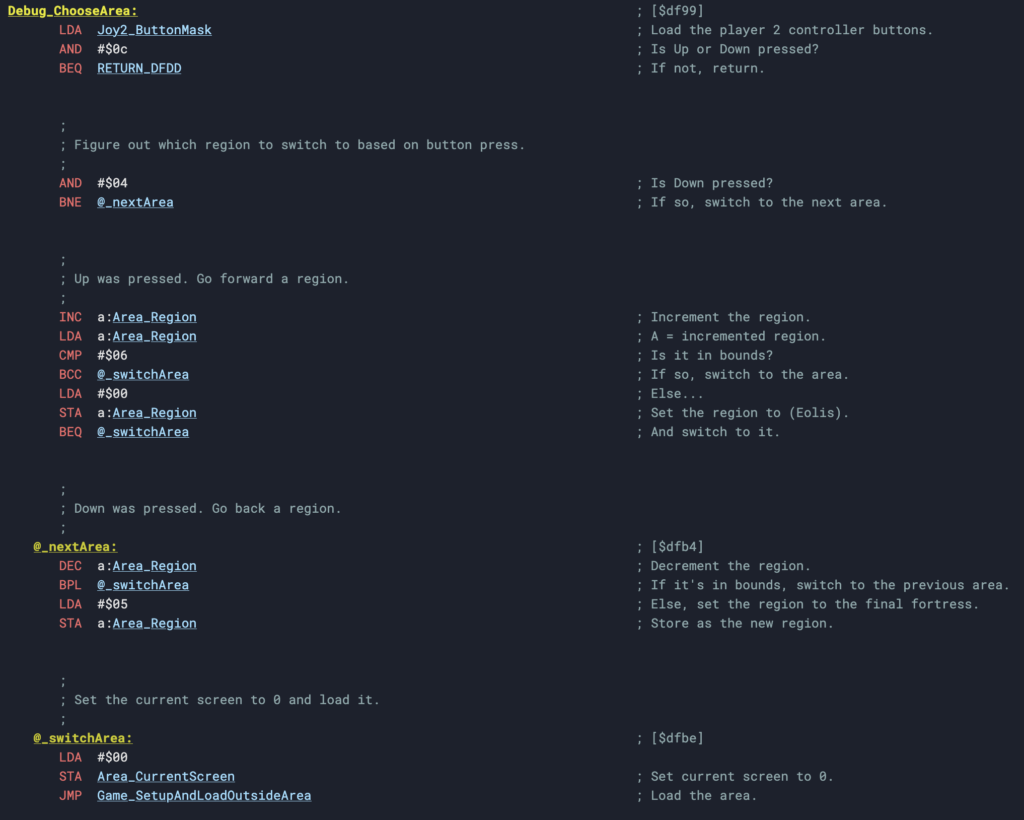
This small sequence of code looks at the controller 2 button mask (the only place in the game that cares about this controller) and checks if Up or Down is pressed.
If Up is pressed: Go forward a world.
If Down is pressed: Go back a world.
That wraps around, so if on Eolis, Down takes you to the Evil Fortress. Up takes you back to Eolis.
This is, by the way, a quick way of getting to the final boss of the game (spoilers!):
Not that it’ll do you much good.
Activating the World Warp
Since this 44 byte packet of debug code is wired off from the game, we have to patch it back in.
We can do this with two Game Genie codes:
OPYISU
NIYIVU
This will turn off your ability to Pause, but turn on the World Warp.
Game Genie codes are just a magic way of saying “At this address in memory, replace the value with a new value.” So let’s start by seeing what those codes translate into:
DB75:99 — Set the value 99 at address 0xDB75 in memory
DB76:DF — Set the value DF at address 0xDB76 in memory
Why those values? Those addresses?
Well, 0xDB75 and 0xDB76 are operands to a JSR instruction (Jump to Subroutine) that specifies an address to call every tick of the game loop. This function is GameLoop_CheckPauseGame at 0xE02B. This is the least-invasive function to replace. We can live without pausing.
We’re swapping that out with our new address: 0xDF99. This is the address where the world warp code lives.
Go ahead, put those Game Genie codes in your NES Game Genie (or your emulator), and press Up or Down on Controller 2. Play around with jumping from different screens, and from inside buildings! You may just glitch into a garbage world for a bit where the screens no longer match up. It’s fun!
The Code behind the World Warp
This code lives in Bank 15 at 0xDF99 in memory. Bank 15 is always in memory, by the way, and contains most of the main game loop, PPU, screen transition, and player state code, amongst others.
Now you may not be intimately familiar with 6502 assembly, which is kind of weird but I’ll allow it. So let’s look at this in C form (a language everyone feels comfortable with!):
I’m using the names I have in my disassembly. These may change over time. The “Region” is the “World” we’re switching between. (They’re not really independent worlds in the game, just regions of the World Tree.)
Pretty simple. Press Up, increase the region/world, and handle wrapping. Do the opposite for Down. Then, set the screen we’re going into and load the area.
Now, although it’s setting the screen number, there’s a lot more to setting the target screen than that, particularly when you’re inside a building. So depending on where you are when you warp, you’ll end up either in some predictable useful locations, or in Garbage Land. Both are fun to play with.
Wait, wasn’t Part 2 about Behavior Scripts?
In my first post in the series, I said I’d be going into Behavior Scripts next. That was a big fat lie. I will be, but today I thought it’d be fun to show off this piece of code that’s been hidden for 2030 (oh my god) 40 years.
We’ll get to Behavior Scripts soon.
If you’d like to follow my Faxanadu work, you can check out the following:
Faxanadu for NES has always been one of my absolute favorite games of the NES library. This adventure starts off in the town of Eolis at the base of the giant World Tree, home to the Elves and Dwarfs. A world corrupted by a poison, transforming the Dwarfs into horrific monsters.
This game’s visuals and musical score always made it a stand-out game for me, and though it didn’t receive the notoriety of Castlevania, Zelda, Kid Kool, or other top-tier action adventure games at the time, it’s increasingly become a favorite to those discovering or rediscovering retro games. Better late than never.
It’s also technically very interesting.
In 2025, I began performing a disassembly of the Faxanadu ROM, using Ghidra and my own crafted Retro-Tinkertoys. The goal was to learn how this game worked, inside and out, and to document it with the hope that it would lead to mods for new games set in this world. And it did.
At this point, all the important parts of the game are either documented or now well-understood. New discoveries, such as hidden code for level switch, remnants of older game designs, unused code, and some interesting bugs have been discovered.
Plus, three built-in binary scripting languages. One for the advanced music engine (MScripts), one for enemy or NPC behavior (BScripts), and one for NPC and item interaction (IScripts).
I’m going to start our deep dive into Faxanadu today by talking about the Interaction Scripts, which I’ll be referring to as IScripts going forward.
What is an IScript?
IScripts define what happens when the player interacts with an entity. That may be an item or an NPC, such as a shopkeeper or villager.
They look like this:
80 # King interaction0D # If Player Has Gold:5A A3 # Then jump to _HAS_GOLD ($A35A).01 # Show Unskippable Message:35 # Message 53 (Exposition).09 # Add Gold to Player:DC 05 # 1500G.00 # End Script._HAS_GOLD:03 # Show Message:36 # Message 54 ("Nothing more I can do to help").00 # End Script.
This particular script is the King, one of the first NPCs you meet in the game. He sends the hero on his quest with enough money to buy a sandwich, bag of chips, and a butter knife. He’s also big into exposition, putting in just enough effort to stand up for a minute to send you off to solve his problems. Royalty.
Any time you talk to the King, that script runs. And knowing how that script runs, we can see that if you spend all your money, he’ll just give you more. Not a new discovery, but this clearly shows how it works. If the player has no gold, give the player gold. The end.
The script is small and simple, but they can do a lot. This is an NES game where bytes and speed matter, so rather than a complex text-based scripting language like you’d find today, this is a compact binary-based scripting language. Every byte is either an instruction or an argument to an instruction. In these scripts, I’ll show the bytes and add comments describing what they do, so you can follow along. Values in the comments are in decimal, and all bytes are in hex.
Structure of a IScript
The entity, aka “Who are we talking to?”
The very first byte of a script states the entity the player is interacting with. If this is anything but 00 (a generic interaction), this will show that entity’s portrait when the script starts. The portrait is animated, and they all blink a lot. It can be unnerving.
Entity IDs can be any of the following:
0x00: Generic interaction
0x80: King
0x81: Guru
0x82: Martial Artist
0x83: Magician
0x84: Doctor
0x85: Nurse
0x86: Pink Shirt Guy
0x87: Smoking Guy
0x88: Meat Salesman
0x89: Tools Salesman
0x8A: Key Salesman
You’ll notice that each entity starts at 0x80. There’s a reason for this. 0x80 is 10000000 in binary. So the entities are all identified as numbers 0 through 10, with the most-significant bit set. The game checks if that bit is set (entity_id & 0x80) in order to determine if it should show a portrait. Then it masks out that bit and uses the number as the index into a portraits table. Neat!
Instructions
After this are instructions. These are actions that can be performed in a script. The game will play through the script’s actions until the script ends (which is an explicit action that all branches need to call!).
There are a lot of instructions. These include instructions that show messages, take or give gold/items/HP/MP, check for inventory items, check for or update the player’s experience title, open shops, check certain objectives or mark them complete, set a spawn point, show a password for the player’s state, goto a script address, or finish the game (the very last instruction ever run).
Each item is 3 bytes: The item ID (1 byte) and the cost in gold (2 bytes).
It’s pretty compact. 5 items would only take 15 bytes.
In Faxanadu, every shop you interact with in the game uses its own shop items table with its own full list of items and their own prices. There’s no start to a shop, technically, so a mod could do something a bit more interesting, though. They could reuse shop data, making one shop a subset of another, by just pointing to an address within another shop.
Let’s go back to IScripts, and check out a few examples within Faxanadu.
Interacting with a shop.
We just looked at a shop, so let’s see how they tie into IScripts. Follow along with me!
89 # Tools Salesman interaction03 # Show Message:0F # Message 3 ("I sell tools, what would you like?")0F # Show Buy or Sell Menu:E0 A3 # If "Buy", jump to _SHOW_BUY ($A3E0).11 # Show Sell Menu:6C A4 # Shop address $A46C,# Then continue after closed.03 # Show Message:02 # Message 2 ("Thank you for shopping.")00 # End Script._SHOW_BUY:08 # Open Shop:6C A4 # Shop address $A46C,# Then continue after closed.03 # Show Message:02 # Message 2 ("Thank you for shopping.")00 # End Script.
This is a common pattern for shops. First, a “Buy or Sell” menu is shown. If the player chooses “Buy”, it’ll jump to one address to open a shop in “Buy” mode. If they choose “Sell”, it’ll continue to the next instruction, and then open a shop in “Sell” mode.
Scripts can give these choices, or only offer a “Buy” or a “Sell”.
Working with the player’s inventory
Shops aren’t the only way to get items into or out of a player’s inventory. There are actions for that. Let’s take a look at this drunk guy in the town of Victim.
00 # Generic interaction0C # If Player Has Title:0A # "Soldier"5A A2 # Then jump to _HAS_RANK ($A25A).03 # Show Message:74 # Message 116 ("Go to the capital...")00 # End Script._HAS_RANK:12 # If Player Has Item:22 # "Armor: Full Plate"63 A2 # Then jump to _HAS_ARMOR ($A263).01 # Show Unskippable Message:75 # Message 117 ("I've got this armor...").07 # Give Item To Player:22 # "Armor: Full Plate".00 # End Script._HAS_ARMOR:03 # Show Message:76 # Message 118 ("I'll have a drink...")00 # End Script.
Here, we have some more branching going on, some player title and item interaction. (Player titles, by the way, are based on your experience, and afford you more gold when you start your game next, more acceleration when walking/running, and maybe surprisingly, a shorter duration for the Wing Boots).
This script checks if the player reached the rank of “Soldier” or higher, they’ll be given the Full Plate armor, if they don’t already have it. If they haven’t advanced that far yet, they’ll be given instructions on where to go next. Dialogue changes based on these conditions.
Working with quests/objectives
Faxanadu tracks what we call “Quests,” which are special objectives the game tracks and includes as part of your password (something we’ll visit in the future).
Quests are represented internally as a few bits in a bitmask. When certain things happen, a particular bit is set. Some IScripts check bits to see how far the user has gotten and what needs to be done next.
When you interact with the man protecting the Spring of Trunk, the man’s IScript does a lot:
It checks if you’ve completed the Spring of Trunk quest, in which case it’s done.
Otherwise, it asks you if you have an elixir you can part with. If not dismissed, it checks for an Elixir in the player’s inventory.
If an Elixir is present, it’ll take it, set the quest as complete, and tell you what to do next.
If an Elixir is not present, you die. *Checks notes*. Sorry, you’re told to come back with an Elixir to awaken the spring.
Here’s how that script looks:
00 # Generic interaction0B # Check If Quest Complete:01 # Quest 1 (Spring of Trunk),C0 A1 # Then jump to _IS_COMPLETE ($A1C0).02 # Show Question Message:59 # Message 89 ("This is the Spring of Trunk. Gimme an Elixir!").12 # If Player Has Item:92 # "Item: Elixir",B9 A1 # Then jump to _HAS_ELIXIR ($A1B9).03 # Show Message:5B # Message 91 ("Come back with an Elixir").00 # End Script._HAS_ELIXIR:01 # Show Unskippable Message:5A # Message 90 ("2 more springs to go!").10 # Remove Item from Player:92 # "Item: Elixir".0E # Set Quest Complete:01 # Quest 1 (Spring of Trunk).00 # End Script._IS_COMPLETE:03 # Show Message:5C # Message 92 ("Find the poison in Mascon").00 # End Script.
You can get a sense as to how complex these can be.
How do you do, Guru?
We’ll end on two more related scripts.
In Faxanadu, you’ll visit Gurus to seek guidance, check your stock portfolio, get a title upgrade (if eligible), and see your new password for your next gaming session. Most Gurus are scripted the same way, with an initial block that’s location-specific and a jump to common Guru scripts (one for new title, one for showing a password):
81 # Guru interaction06 # Set Spawn Point:03 # Temple 3 (Mascon).04 # Check to Update Player Title:00 A6 # If updated, jump to COMMON_GURU_NEW_TITLE ($A600).17 # Jump to:FC A5 # COMMON_GURU_SHOW_PASSWORD ($A5FC).COMMON_GURU_NEW_TITLE:01 # Show Unskippable Message:23 # Message 35 ("I shall give you a title of...").00 # End Script.COMMON_GURU_SHOW_PASSWORD:03 # Show Message:22 # Message 34 ("I shall meditate with you").14 # Show Password.00 # End Script.
But in the town of Conflate, there’s a Guru that goes above and beyond by giving you the very important Ring of Dworf (you need this to unlock a certain door — yes, that’s the spelling, it’s not my fault) if you’ve met the criteria (you need the Battle Suit).
81 # Guru interaction12 # If Player Has Item:23 # "Armor: Battle Suit",34 A6 # Then jump to _HAS_BATTLE_SUIT ($A634).# This is the same logic normally seen in other Guru scripts._STANDARD_GURU_LOGIC:06 # Set Spawn Point:05 # Temple 5 (Conflate).04 # Check to Update Player Title:00 A6 # If updated, jump to COMMON_GURU_NEW_TITLE ($A600).17 # Jump to:FC A5 # COMMON_GURU_SHOW_PASSWORD ($A5FC).# And this is the new "Got a Battle Suit? Here's a ring to go with it!" logic._HAS_BATTLE_SUIT:12 # If Player Has Item:82 # "Special Item: Ring of Dworf",2C A6 # Then jump to _STANDARD_GURU_LOGIC.01 # Show Unskippable Message:8C # Message 140 ("Here's how you get to Dartmore...").07 # Add Item to Player:82 # "Special Item: Ring of Dworf".00 # End Script.
You can see not only how they can make different versions of the same type of NPC more complex, but how scripts can jump to other scripts, reusing building blocks built elsewhere. While Faxanadu doesn’t have a ton of shared scripts, modders can do a lot with this to optimize their code.
IScripts: They’re super versatile!
Someone modding the game could do a lot to build upon this. For example:
Have the right combination of items fetched throughout the game, and you’ll be given an end-game item.
Shop prices change based on player title (using different shop addresses).
Available items in a shop grow or shink as you progress in the game.
Dismiss an NPC’s story too many times, and the NPC takes all your money.
And since IScripts also apply to item interactions:
Lose money when picking up an item.
Exchange one item for another.
Health-replenishing items.
This can all be built just using the IScript instructions. More advanced games can do even more by rewriting some of the assembly code backing these commands. But that’s a topic to cover later.
But how does it do all this?
Obviously these batches of bytes don’t do the work themselves. This isn’t assembly code, it’s just data.
Behind the scenes is a small scripting runtime, consisting of a few parts:
A script runner function that can be called when the player collides with an item or interacts with an NPC.
A table of IScript entrypoints (generally one slot per script, keyed off by an ID assigned to an item, NPC, or event, and also split into lower/upper bytes tables).
Starting a script
We start our journey at IScripts_Begin. This is our script runner. It takes the index into the IScript entrypoint table and does the following:
Loads the address of the IScript, given the entrypoint in the table.
Reads the first byte as the interaction entity ID, storing that so any portrait display can pull up the right images.
Prepares for any text or shop display (IScripts almost always show a textbox or shop, so it gets this ready).
It’s a simple loop. It does exactly what it needs to do. It’s fast and efficient and powers almost everything you interact with in the game.
Mods could extend the handlers table and build all-new action handlers for their game. It’d require moving some things around, but it would be entirely doable.
Time for a demo
Actually, I’ll give you two of my very own.
Demo 1: The ultimate Faxanadu speedrun
The first is the fastest speed run of Faxanadu, where our hero learns that there’s more to life than deserted towns and monsters hanging out in overgrown trees.
This uses a custom message along with the “Finish Game” instruction, which, well, ends the game. It looks like this:
00 # Generic entity01 # Show Unskippable Message:01 # Message 01 ("... On second thought...").15 # Finish Game.
Demo 2: Beer Run!
I like this one. It’s the very first mod built with IScripts. I built it it to test what I was disassembling and documenting.
Our hero comes home to find the local economy in ruins. Upon entering the town, a bum asks him to buy him a beer. This little fetch quest has a nice reward at the end.
It involves a number of new scripts (none of which I have anymore, oops — early testing). One NPC has been given shop capabilities, and another has a few items to hand out.
Next Up: Behavior Scripts
So that’s how Faxanadu handles interactions behind the scenes. Not a bunch of assembly logic (well, not just…), but rather simple-yet-powerful space-efficient scripts and a little scripting engine.
I mentioned before that this is just one of three scripting engines built into the game. Next time, we’ll dig into how enemies, bosses, and NPCs behave, using Behavior Scripts.
If you’d like to follow my Faxanadu work, you can check out the following: