There’s a lot about Faxanadu that’s been kept secret since the game was originally developed in the 80s. Secrets I’ve been discovering in my Faxanadu disassembly work.
One of the most surprising to me was hidden code for a World Warp, letting you jump to any of the 6 regions of the game: Eolis, Trunk, Mist, Branch, Dartmoor, or the Evil Fortress.
All with a single button press. (And a couple of Game Genie codes.)
If you’re new to this series, see:
The World Warp
During development of Faxanadu, code was put in the game to make it easy to jump to other areas within the game for testing. This isn’t an uncommon thing for game developers to do. You don’t want to have to play through half the game every time you want to re-test the fog animation in the world of Mist.
This code was wired off from the rest of the game, existing only as a sequence of 44 bytes.
This small sequence of code looks at the controller 2 button mask (the only place in the game that cares about this controller) and checks if Up or Down is pressed.
If Up is pressed: Go forward a world.
If Down is pressed: Go back a world.
That wraps around, so if on Eolis, Down takes you to the Evil Fortress. Up takes you back to Eolis.
This is, by the way, a quick way of getting to the final boss of the game (spoilers!):
Not that it’ll do you much good.
Activating the World Warp
Since this 44 byte packet of debug code is wired off from the game, we have to patch it back in.
We can do this with two Game Genie codes:
OPYISUNIYIVU
This will turn off your ability to Pause, but turn on the World Warp.
Game Genie codes are just a magic way of saying “At this address in memory, replace the value with a new value.” So let’s start by seeing what those codes translate into:
DB75:99— Set the value99at address0xDB75in memoryDB76:DF— Set the valueDFat address0xDB76in memory
Why those values? Those addresses?
Well, 0xDB75 and 0xDB76 are operands to a JSR instruction (Jump to Subroutine) that specifies an address to call every tick of the game loop. This function is GameLoop_CheckPauseGame at 0xE02B. This is the least-invasive function to replace. We can live without pausing.
We’re swapping that out with our new address: 0xDF99. This is the address where the world warp code lives.
Go ahead, put those Game Genie codes in your NES Game Genie (or your emulator), and press Up or Down on Controller 2. Play around with jumping from different screens, and from inside buildings! You may just glitch into a garbage world for a bit where the screens no longer match up. It’s fun!
The Code behind the World Warp
This code lives in Bank 15 at 0xDF99 in memory. Bank 15 is always in memory, by the way, and contains most of the main game loop, PPU, screen transition, and player state code, amongst others.
Here’s what the code looks like:
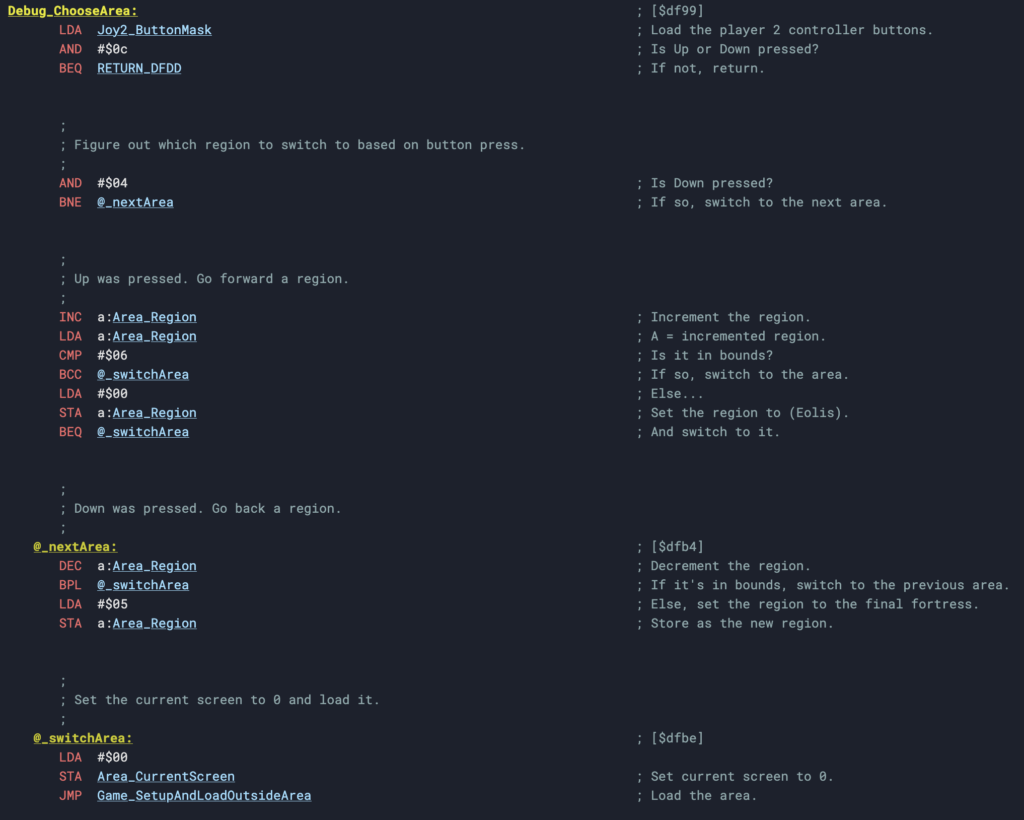
You can view this on the disassembly.
Now you may not be intimately familiar with 6502 assembly, which is kind of weird but I’ll allow it. So let’s look at this in C form (a language everyone feels comfortable with!):
void Debug_ChooseArea(void)
{
  if ((Joy2_ButtonMask & BUTTON_BIT_UP) != BUTTON_BIT_NONE) {
    // Going up.
    Area_Region++;

    if (Area_Region > REGION_EVIL_FORTRESS) {
      Area_Region = REGION_EOLIS;
    }
  }
  else if ((Joy2_ButtonMask & BUTTON_BIT_DOWN) != BUTTON_BIT_NONE) {
    // Going down.
    Area_Region--;

    if (Area_Region < 0) {
      Area_Region = REGION_EVIL_FORTRESS;
    }
  }

  Area_CurrentScreen = 0;
  Game_SetupAndLoadArea();
}I’m using the names I have in my disassembly. These may change over time. The “Region” is the “World” we’re switching between. (They’re not really independent worlds in the game, just regions of the World Tree.)
Pretty simple. Press Up, increase the region/world, and handle wrapping. Do the opposite for Down. Then, set the screen we’re going into and load the area.
Now, although it’s setting the screen number, there’s a lot more to setting the target screen than that, particularly when you’re inside a building. So depending on where you are when you warp, you’ll end up either in some predictable useful locations, or in Garbage Land. Both are fun to play with.
Wait, wasn’t Part 2 about Behavior Scripts?
In my first post in the series, I said I’d be going into Behavior Scripts next. That was a big fat lie. I will be, but today I thought it’d be fun to show off this piece of code that’s been hidden for 20 30 (oh my god) 40 years.
We’ll get to Behavior Scripts soon.
If you’d like to follow my Faxanadu work, you can check out the following:
- Annotated Faxanadu Disassembly
- Faxanadu Technical Notes
- Faxanadu Disassembly GitHub
- Retro-Tinkertoys: My home-grown disassembly tooling for Ghidra
And you can follow my efforts on: